
This guide covers Ritzobet login process for players in Bangladesh: how to sign in to an existing user account, which authentication methods the site offers, where password recovery sits, and what our access tests showed, including mobile. It also covers the sign-in errors players meet most often. Login credentials work only for an existing registration, so new players need to create an account first and activate it. Everything below refers to the official ritzobet.com website.
What to Check Before Signing In
Go through these points first. Most failed sign-ins come from one of them.
| Check | What to confirm |
|---|---|
| Official Ritzobet website | The address is the official .com domain |
| Account registration status | You must be registered user |
| Registered email address or phone number | Use the identifier you signed up with, whichever method you choose |
| Password | Needed for email and phone login. |
| Internet connection | Stable Wi-Fi or mobile data. The page needs it to load |
| Browser session | Reload the page or clear the site’s cookies if the form stays blank |
| Verification code | Required for SMS or telegram login |
How to Access Your Ritzobet Account
To log in to your personal account, follow these steps:
- Visit the Ritzobet website.
- Open the login page.
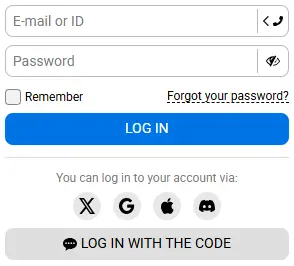
- Choose a method: by email, by phone or by social networks.
- Enter your credentials in the login form..
- Press the “Log in” button.
After a successful login, the site opens your dashboard — the account area with your balance and the deposit button in view. If you’re on your own device, tick the “Remember” box before you press the login button. That saves your credentials on the device, so you won’t have to enter them next time.
Forgotten Password Recovery
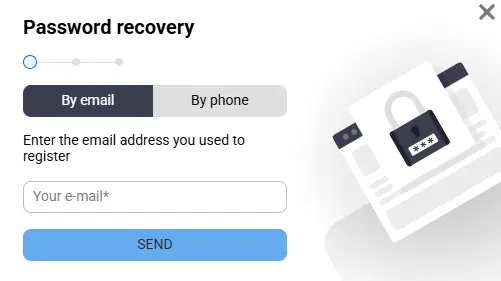
Password recovery starts in the login form, so you do not need to contact anyone first. At Ritzobet, you can reset your password using your email address or phone number. Here’s how:
- Open the login form and select Forgot your password?
- Enter your registered email address or phone number.
- Wait for the verification code or reset link. Ritzobet sends it by email, by SMS or to your Telegram account.
- Follow the link or enter the code to confirm the request.
- Set a new password and confirm it.
Right after recovery the system asks you to change your password, so do it at that step and save the new one. Pick a password you do not use on other sites. You will need it for both email and phone login.
If the reset email or SMS does not arrive, request it again; if it still does not come, support can restore access.
Ritzobet Login Test Results: Time, Device and Method
We tested each login method on a Samsung Galaxy A17 5G, using the mobile site for the main checks and the Ritzobet Android app to confirm the authentication process. All tests ran over Wi-Fi, so times will vary with your connection. A login counted as successful when the account opened quickly, with no delay and no frozen screen. Time was measured from pressing “Log in”, so it reflects how long the site takes to process your data.
Email Login Test
Signing in with an email address and password took 3 seconds and worked on the first attempt, with no error messages.
| Parameter | Result |
|---|---|
| Test date | 12 October 2026 |
| Device | Samsung Galaxy A17 5G, Android 8.0 |
| Browser or app | Mobile site |
| Credentials | Email address and password |
| Login method | By email |
| Time taken | 3 sec |
| Result | Successful |
| Issues | None |
Phone Number Login Test
A registered phone number with country code and a password was enough to sign in. The site did not ask for an SMS code, and the login took 4 seconds.
| Parameter | Result |
|---|---|
| Test date | 12 October 2026 |
| Device | Samsung Galaxy A17 5G, Android 8.0 |
| Browser or app | Google Chrome |
| Credentials | Phone number with country code and password |
| Login method | By phone |
| Time taken | 4 sec |
| Result | Successful |
| Issues | None |
Social Login Test
The login form offers Google, X, Apple ID, Discord and LinkedIn. We tested Google: the sign-in took 10 seconds and returned us to the account area. The other four networks were not tested.
| Parameter | Result |
|---|---|
| Test date | 12 October 2026 |
| Device | Samsung Galaxy A17 5G, Android 8.0 |
| Social provider | Google account |
| Login method | By social networks |
| Time taken | 10 sec |
| Result | Successful |
| Issues | None |
Testing sign in with the confirmation code
The “Log in with the code” option sends an SMS code to your registered phone number. Entering it opened the account in 12 seconds, the longest of the four methods because it includes waiting for the message.
| Parameter | Result |
|---|---|
| Test date | 12 October 2026 |
| Device | Samsung Galaxy A17 5G, Android 8.0 |
| Credentials | Registered phone number, code from SMS |
| Sign-in option | Log in with the code |
| Time taken | 12 sec |
| Result | Successful |
| Issues | None |
Signing in on Mobile Application
If you have already downloaded the Ritzobet app, sign in there with the same credentials you use on the site. We tested login in the Android app as well:
| Parameter | Result |
|---|---|
| App version | Ritzobet Android APK |
| Device | Samsung Galaxy A17 5G, Android 8.0 |
| Email login | 2 sec |
| Phone login | 3 sec |
| Social login (Google) | 10 sec |
| Result | Successful |
| Issues | None |
Troubleshooting Login Problems
Start with the message on the screen: it tells you which problem you have, and each case below has its own fix. The full sign-in steps are in the section above, so they are not repeated here. These are the problems Ritzobet users meet most often, not a complete list.
Incorrect Email, Phone Number or Password
Make sure you enter the same email address or phone number you registered with, and add the country code if you sign in by phone. Check for stray spaces, the wrong keyboard layout and Caps Lock. If the password is still rejected, use “Forgot your password?” in the login form.
Account Not Activated After Registration
When activation is the cause, the site shows a message on the screen saying the account is not activated. Look for the verification email in your inbox and spam folder and open the activation link. The link is valid for 72 hours, so if it has expired, you need to register again.
Access Restricted or Account Temporarily Unavailable
A restriction or temporary suspension can follow a security review or unusual login activity on the account. Contact official support to find out the reason and what you need to do next. Do not open a second account or try to get around the restriction.
Does Ritzobet Have Two-Factor Authentication?
If you have the Google Authenticator app installed on your device, you can enable two-factor authentication and log in using your password and a one-time code. To enable two-factor authentication, log in to Ritzobet, go to “Account Settings,” and click “Enable” in the “Two-Factor Authentication” section. This will provide additional protection for your personal account.